(Day 53) Task : Understanding DNS and Amazon Route 53
In Phase 6 of my StudentHub Cloud Platform project, I explored the fundamentals of DNS (Domain Name System) and learned how Amazon Route 53 can connect a custom domain to an Amazon CloudFront distribution.
In the previous phases, I built an AWS network, configured IAM, deployed an EC2 instance, and hosted a static website using Amazon S3 and CloudFront. My website includes index.html, style.css, and script.js.
For this phase, I focused on understanding how DNS works, how DNS records are stored and resolved, and how Route 53 fits into a cloud architecture. I used my existing CloudFront distribution for practical verification without purchasing a domain or creating additional chargeable AWS resources.
1. What Is DNS?
DNS stands for Domain Name System. It helps translate human-readable domain names into information that computers use to locate internet services.
For example, instead of remembering an IP address, a user can enter a domain name into a browser.
DNS helps the browser discover the appropriate destination. For an A record, DNS returns an IPv4 address; for an AAAA record, it returns an IPv6 address. Other record types provide different information.
DNS does not host or deliver the website itself. It helps the browser locate the service that delivers it.
2. Where Are DNS Records Stored?
DNS is a distributed system, meaning its information is maintained across many servers rather than one central database.
The main components are:
- Authoritative DNS servers: Provide the official DNS records for a domain.
- Recursive DNS resolvers: Find DNS answers on behalf of clients and may cache responses.
- Local DNS caches: Computers and browsers may temporarily store DNS answers to reduce repeated lookups.
When a user visits a website, the resolver may use a cached answer or query the DNS hierarchy to obtain the information it needs.
For public DNS, the lookup can involve root DNS servers, top-level domain (TLD) servers, and the domain's authoritative name servers.
3. What Is Amazon Route 53?
Amazon Route 53 is AWS's managed DNS service. It lets users manage DNS records and direct domain traffic toward supported destinations.
Route 53 can also provide domain registration for supported domains.
In a typical AWS architecture, Route 53 manages DNS records, CloudFront distributes website content, and Amazon S3 stores static website assets.
These services perform different roles:
- Route 53: DNS management and resolution.
- CloudFront: Content delivery through a global network of edge locations.
- Amazon S3: Storage for static website files.
- AWS Certificate Manager (ACM): Manages TLS certificates used to enable HTTPS with supported AWS services.
4. Important DNS Concepts
Domain Name
A domain name is a human-readable internet name, such as example.com.
To use a custom domain for a website, you must control the domain and configure its DNS appropriately.
DNS Record
A DNS record defines information about a domain or hostname.
Common record types include:
- A: Maps a hostname to an IPv4 address.
- AAAA: Maps a hostname to an IPv6 address.
- CNAME: Points a hostname to another hostname.
- MX: Identifies mail servers for a domain.
- NS: Identifies the authoritative name servers for a DNS zone.
Route 53 Hosted Zone
A hosted zone is a container for DNS records belonging to a domain.
A public hosted zone contains records intended for resolution on the public internet. To make it authoritative for a domain, the domain's DNS delegation must point to the appropriate name servers.
Alias Record
A Route 53 Alias record can point a domain or subdomain to supported AWS resources, including CloudFront distributions.
An important advantage is that Alias records can be used for the zone apex, such as example.com, where a regular CNAME record cannot be used.
5. StudentHub Architecture
My existing StudentHub website is served through Amazon CloudFront, with Amazon S3 storing the website files.
The current architecture is:
Browser → CloudFront → Amazon S3
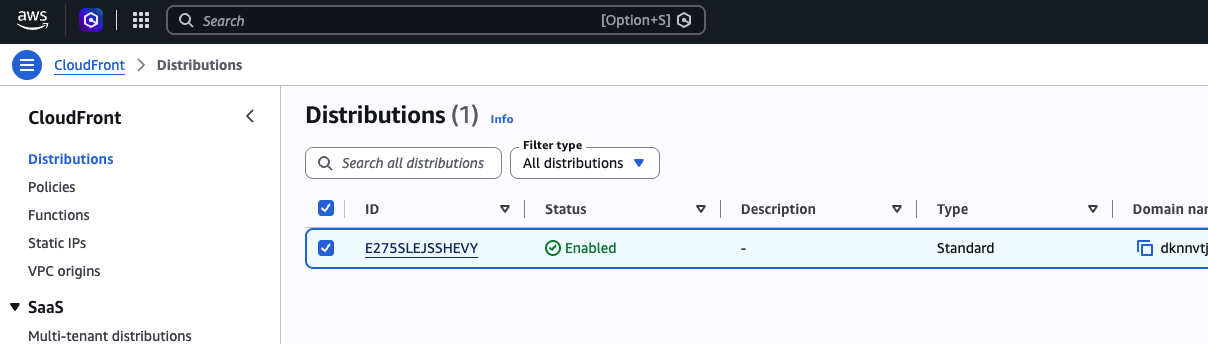
The CloudFront distribution's default domain is:
https://dknnvtj5n5i96.cloudfront.net
The website uses:
index.htmlfor page structure.style.cssfor styling.script.jsfor client-side interaction.
I verified that the CloudFront website loads, the CSS file is accessible, the JavaScript file is accessible, and the details button works.
These checks confirmed that the existing website assets and client-side interaction were functioning through CloudFront at the time of testing.
6. How Route 53 Can Connect a Custom Domain to CloudFront
If I connect a custom domain in the future, the architecture can be extended as follows:
Visitor → Custom Domain → Route 53 DNS → CloudFront → Amazon S3
The general configuration process is:
- Register a domain and confirm control of its DNS.
- Create a Route 53 public hosted zone, if Route 53 will manage the public DNS.
- Configure the domain's name-server delegation.
- Request an appropriate public TLS certificate through AWS Certificate Manager in
us-east-1, which CloudFront requires for ACM certificates. - Validate the certificate, typically using DNS validation.
- Add the custom domain as an alternate domain name on the CloudFront distribution.
- Create Route 53 Alias records pointing the domain and, if needed, its
wwwhostname to CloudFront. - Wait for DNS propagation and CloudFront deployment, then test the website over HTTPS.
This is the planned future configuration, not a deployment completed in this phase.
7. Practical Verification
To keep this phase cost-conscious, I used my existing CloudFront distribution rather than purchasing a domain or creating a Route 53 hosted zone.
I verified the following:
- The CloudFront website was accessible.
- The CSS asset could be opened directly.
- The JavaScript asset could be opened directly.
- The website's details button worked.
DNS can also be explored from a local terminal using commands such as:
dig google.com
To inspect name-server records:
dig NS google.com
To trace the DNS hierarchy:
dig +trace google.com
These commands query DNS and do not create AWS resources.
8. Cost Considerations
This phase was designed to avoid additional AWS charges.
I did not purchase a custom domain or create a Route 53 hosted zone. Domain registration and public hosted zones can incur charges, so I plan to configure a custom domain when I am ready to manage those costs.
My existing CloudFront distribution remains the entry point for the website.
9. What I Learned
Through this phase, I learned:
- How DNS helps browsers find internet services.
- The difference between authoritative DNS servers and recursive resolvers.
- How DNS records and hosted zones work.
- The purpose of Amazon Route 53.
- How Alias records can connect domains to CloudFront.
- Why CloudFront requires an appropriate certificate for custom-domain HTTPS.
- How DNS fits into a cloud-hosted static website architecture.
- How to verify website assets without changing deployed AWS resources.
Conclusion
Phase 6 helped me understand the DNS layer behind cloud-hosted applications and how Amazon Route 53 can complement CloudFront and Amazon S3.
I kept this phase focused on learning and verification without purchasing a domain or creating additional chargeable resources. Connecting a real custom domain will be a future extension of StudentHub.
This project is helping me build my AWS and cloud infrastructure knowledge through practical, incremental work.
#AWS #AmazonRoute53 #CloudFront #AmazonS3 #DNS #CloudComputing #DevOps #StudentHub
About the author
- DevOps Enthusiast | Python | Chef | Docker | GitHub | Linux | Shell Scripting | CI/CD & Cloud Learner | AWS
Comments
Join the discussionNo comments yet. Be the first to comment.