(Day 55) Task : Building a Serverless Backend with Amazon DynamoDB, AWS Lambda & API Gateway
Introduction
In Part 1 of StudentHub Phase 7, I built a serverless backend using AWS Lambda and Amazon API Gateway.
I created a Lambda function using Node.js, configured an HTTP API, and connected the API to the StudentHub frontend.
However, the student records were initially hardcoded inside the Lambda function.
In Part 2, I took the next step by integrating Amazon DynamoDB to store student information persistently and retrieve it dynamically through the backend.
The objective was to understand how a frontend communicates with backend services, how Lambda interacts with a NoSQL database, and how IAM permissions control access to AWS resources.
By the end of this phase, StudentHub had a working serverless backend connected to a persistent database.
1. Understanding the Architecture
Before implementing DynamoDB, it is important to understand how the different AWS services communicate.
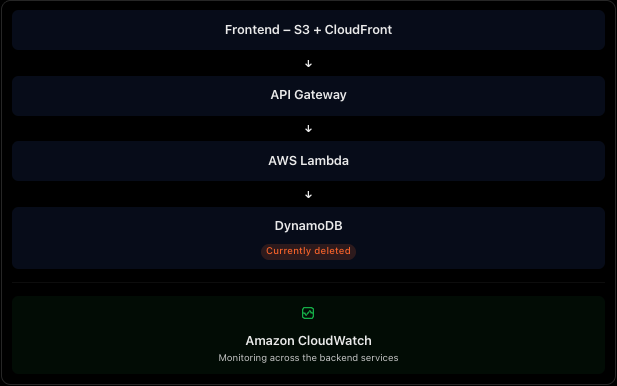
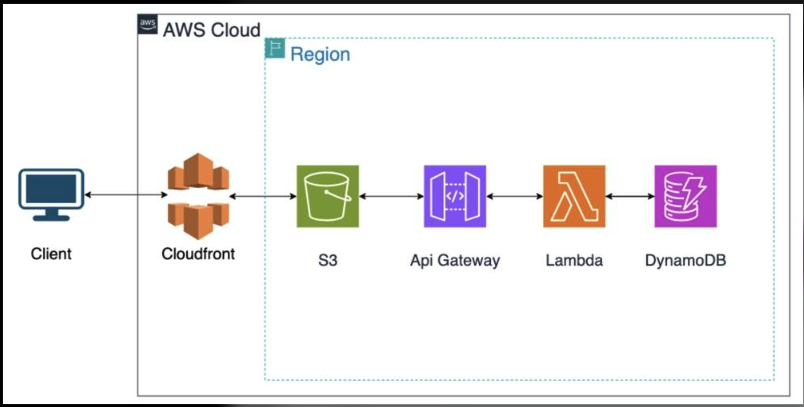
StudentHub uses the following architecture:
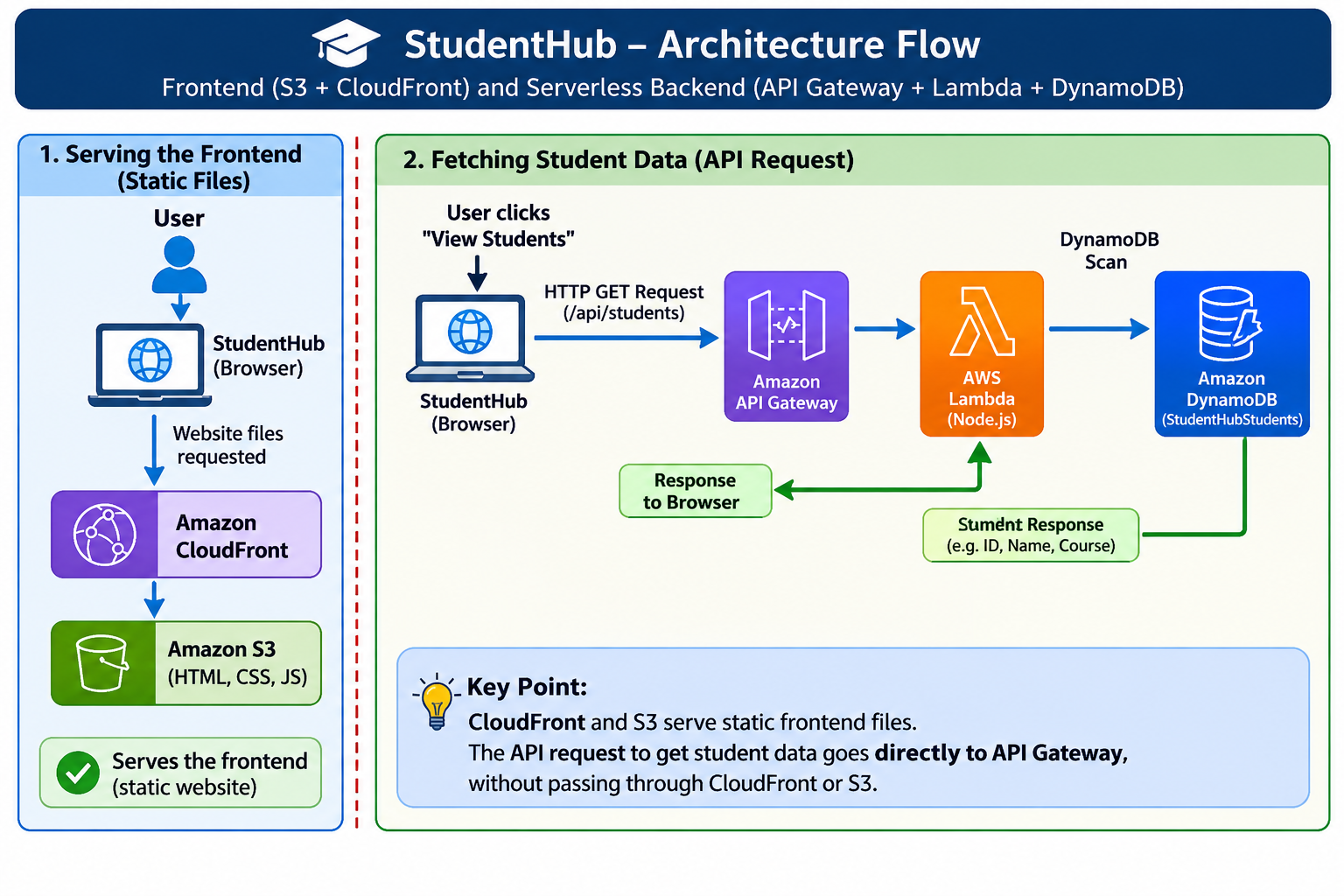
Important architecture concept:
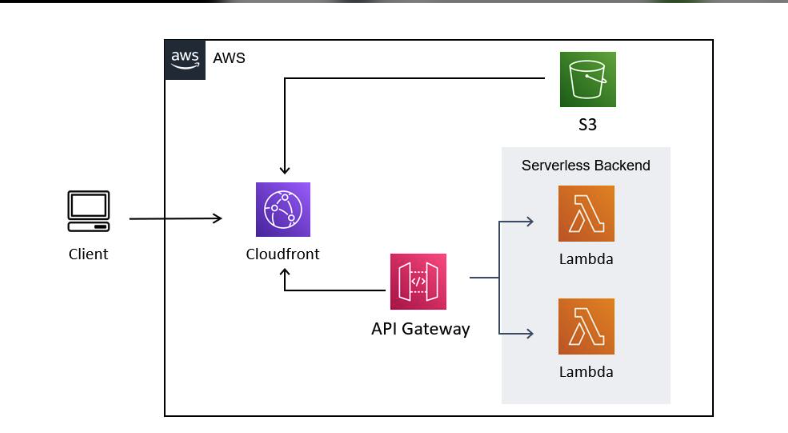
CloudFront and S3 serve the static frontend files. When the user clicks View Students, the browser sends a separate API request directly to API Gateway.
The API request does not travel through CloudFront or S3.
2. Creating an Amazon DynamoDB Table
The first step was creating a database to store student information.
I used Amazon DynamoDB, a fully managed NoSQL database service provided by AWS.
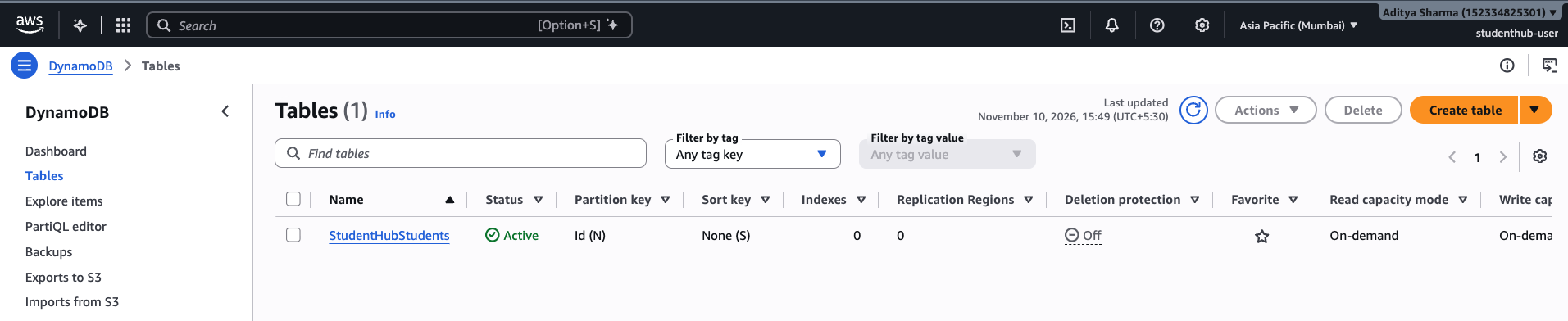
Table Configuration
| Configuration | Value |
|---|---|
| Table name | StudentHubStudents |
| Table class | DynamoDB Standard |
| Capacity mode | On-demand |
| Partition key | id |
| Partition key type | Number |
What is a NoSQL Database?
Unlike relational databases such as MySQL and PostgreSQL, DynamoDB does not require a predefined schema for every non-key attribute.
For example, our student records contain:
- id
- name
- course
The partition key is required to identify each item, while additional attributes can be added as needed.
Understanding Partition Keys and Sort Keys
Partition Key:
A partition key is used to identify and distribute items within a DynamoDB table.
In StudentHub, id is the partition key because each student has a unique ID.
Sort Key:
A sort key can be combined with a partition key to create a composite primary key.
For example, if one student could have multiple course records, a composite key could be useful.
However, our current application uses unique student IDs, so a partition key alone is sufficient.
3. Adding Student Records to DynamoDB
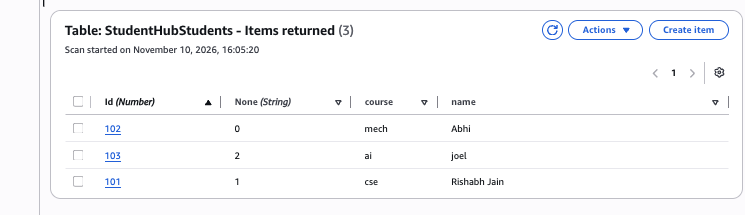
After creating the table, I added three sample student records.
StudentHubStudents Table
| ID | Name | Course |
|---|---|---|
| 101 | Rishabh Jain | CSE |
| 102 | Abhi | Mech |
| 103 | Joel | AI |
The records are stored as individual DynamoDB items.
4. Configuring IAM Permissions for Lambda
Creating a DynamoDB table is not enough. Our Lambda function also needs permission to access it.
AWS uses IAM (Identity and Access Management) to control access to AWS resources.
Every Lambda function can use an execution role that defines what AWS services and resources it can access.
Lambda Execution Role
Role name:
studenthub-get-students-role
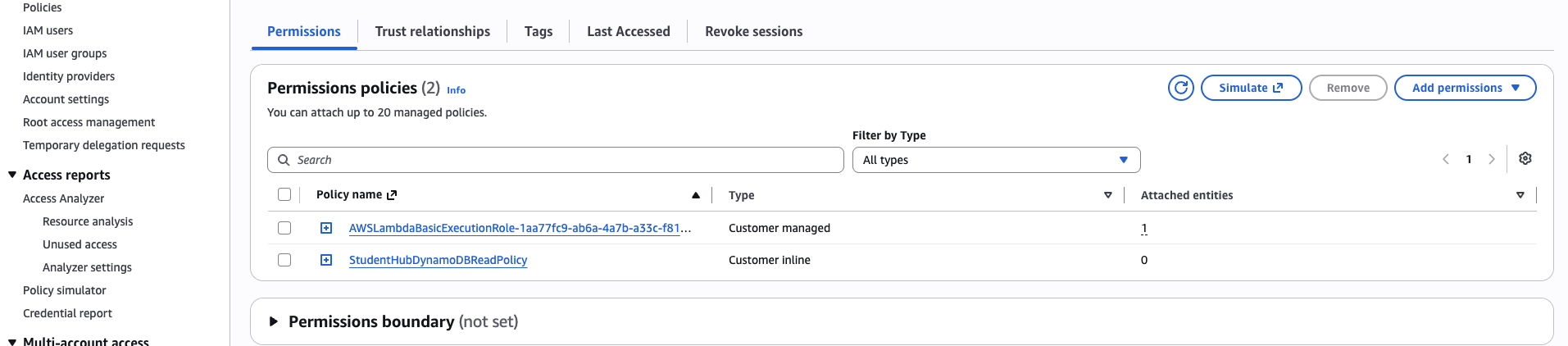
The existing role already had:
AWSLambdaBasicExecutionRole
This managed policy allows Lambda to write execution logs to Amazon CloudWatch.
I created an additional inline policy:
StudentHubDynamoDBReadPolicy
IAM Policy
The policy grants permission to perform the DynamoDB Scan operation on our specific table.
{
  "Version": "2012-10-17",
  "Statement": [
    {https://cdn.hashnode.com/uploads/covers/67e296ceba50f8341dadb994/92bd16e3-f54a-4317-a831-6c5f2b4d5e7b.png
      "Sid": "AllowStudentHubDynamoDBScan",
      "Effect": "Allow",
      "Action": [
        "dynamodb:Scan"
      ],
      "Resource": "arn:aws:dynamodb:ap-south-1:152334825301:table/StudentHubStudents"
    }
  ]
}
Why Use an Inline Policy?
Instead of attaching broad DynamoDB permissions, I created a custom policy that allows only the required operation on the StudentHubStudents table.
This follows the Principle of Least Privilege.
The principle means granting only the permissions required to perform a specific task.
For our current GET endpoint, Lambda only needs permission to read all student records using Scan.
5. Connecting AWS Lambda to DynamoDB
Now that DynamoDB and IAM permissions were configured, the next step was updating the Lambda function.
Previously, the function contained hardcoded student records.
I replaced that implementation with database retrieval using the AWS SDK for JavaScript.
Lambda Configuration
| Setting | Value |
|---|---|
| Function name | studenthub-get-students |
| Runtime | Node.js 22.x |
| Region | ap-south-1 |
| Architecture | x86_64 |
| Database | StudentHubStudents |
6. API Gateway Integration
API Gateway was already configured in Part 1.
For Part 2, I kept the existing API and updated the Lambda function to retrieve records from DynamoDB.
API Configuration
| Configuration | Value |
|---|---|
| API name | studenthub-http-api |
| API type | HTTP API |
| API ID | mwnic5mz36 |
| Region | ap-south-1 |
| Route | GET /api/students |
| Integration | AWS Lambda |
| Stage | $default |
| Auto-deploy | Enabled |
7. Testing the Lambda Function
After updating the Lambda implementation, I deployed the function and tested it using the Lambda console.
The test did not require additional input because the current GET operation retrieves all student records without needing a student ID.
The Lambda test executed successfully.
The result confirmed that:
- The Lambda function was running successfully.
- Its execution role had the required DynamoDB permission.
- It could communicate with the StudentHubStudents table.
- It could retrieve student records.
- It could return the data in the expected response format.
8. Testing the API Gateway Endpoint
After verifying the Lambda function, I tested the API Gateway endpoint directly in the browser.
The API successfully returned the student records stored in DynamoDB.
Actual API Response
The response contained the following information:
| ID | Name | Course |
|---|---|---|
| 101 | Rishabh Jain | CSE |
| 102 | Abhi | Mech |
| 103 | Joel | AI |
The response also included a success message confirming that the StudentHub backend was working.
This was an important milestone because the API was no longer returning only hardcoded records. It was retrieving actual records from the DynamoDB table.
9. Testing the API Gateway Endpoint
After verifying the Lambda function, I tested the API Gateway endpoint directly in the browser.
The API successfully returned the student records stored in DynamoDB.
Actual API Response
The response contained the following information:
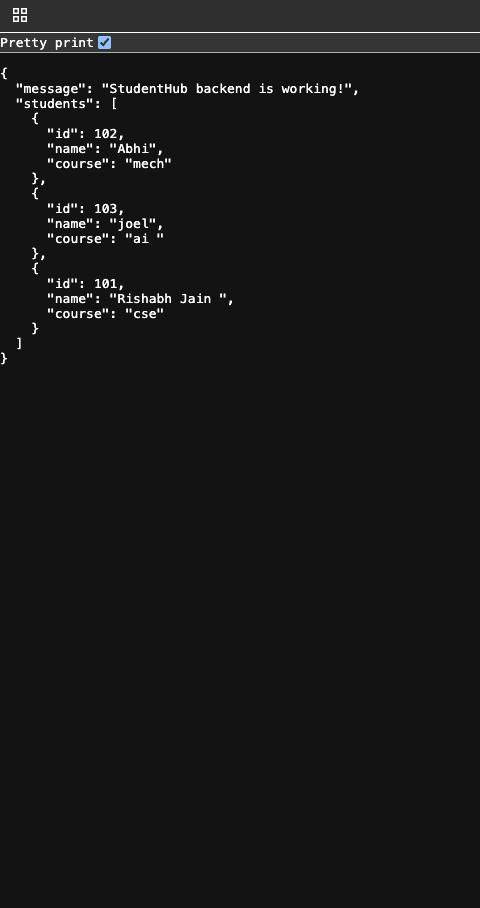
The response also included a success message confirming that the StudentHub backend was working.
This was an important milestone because the API was no longer returning only hardcoded records. It was retrieving actual records from the DynamoDB table.
10. Connecting the Backend to the StudentHub Frontend
The final step was verifying the complete application.
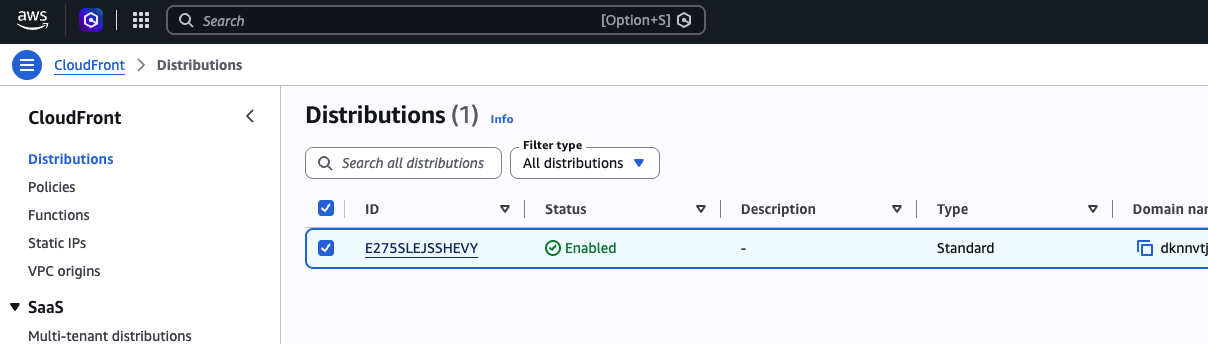
The StudentHub frontend was already hosted using Amazon S3 and CloudFront.
The website contains a Student Directory section with a View Students button.
When the user clicks this button:
- Frontend JavaScript sends a GET request to API Gateway.
- API Gateway invokes the Lambda function.
- Lambda retrieves records from DynamoDB.
- The backend returns the student information.
- Frontend JavaScript processes the response.
- The student ID, name, and course are displayed on the website.
This completed the connection between the frontend and the persistent database.
Problem 1: Student Details Displayed as Undefined
Initially, the frontend displayed undefined values for student ID, name, and course.
Reason:
The attribute names in DynamoDB did not consistently match the property names expected by the frontend.
JavaScript is case-sensitive, so different capitalization can result in missing values.
Solution:
I inspected the actual DynamoDB records and standardized the attributes returned by Lambda.
Problem 2: Some Student Attributes Were Missing
Some records were returned with missing names or course information.
Reason:
Certain DynamoDB items contained incomplete or inconsistent attributes.
Solution:
I inspected the database records, corrected the inconsistent data, and removed an unnecessary None attribute.
Problem 3: Student Records Appeared in an Unexpected Order
The student records were not initially displayed in the expected ID sequence.
Reason:
DynamoDB Scan does not guarantee the order of returned items.
Solution:
I added sorting in the Lambda function so the student records could be displayed in ascending order by ID.
Problem 4: Understanding IAM Permissions
I needed to understand how Lambda could access DynamoDB securely.
Solution:
I used the Lambda execution role and added a custom inline IAM policy with permission to scan only the StudentHubStudents table.
These issues helped me understand the importance of consistent database attributes, IAM permissions, and proper backend response handling.
About the author
- DevOps Enthusiast | Python | Chef | Docker | GitHub | Linux | Shell Scripting | CI/CD & Cloud Learner | AWS
Comments
Join the discussionNo comments yet. Be the first to comment.